

OAuth is coming. Until then every client that can send a header connects today. ChatGPT and the claude.ai connector directory cannot send a key, so they connect once OAuth lands.
Before you start
1
Make a key
Open Settings › API in Poll the Room and make a key. The secret is shown once.
2
Give it only what the agent needs
An agent that builds decks needs
decks:read and decks:write. Add rooms:start, which the Pro plan sells, and results:read only when it should run the room and read the answers. See scopes.3
Keep it out of files you share
Where a client can read the key from an environment variable, the examples below do that. Set it once in your shell profile.
Connect
Pick your client. Every example names the serverpolltheroom.
- Claude Code
- Cursor
- Claude Desktop
- VS Code
- Codex
- Gemini CLI
- Windsurf
- Antigravity
- OpenCode
- Zed
--scope user makes it available in every project. Run claude mcp list and the server shows as connected; in a session, /mcp shows the same.To share the server with everyone on a project, put it in .mcp.json at the project root instead. Claude Code fills in the key from each person’s own environment.Authorization: Bearer ptr_YOUR_KEY.
Check that it works
1
Ask for one slide and a look at it
Make a deck called “Q3 kick-off” with one slide. Put the title “Q3 kick-off” on the left, and beside it a multiple-choice card asking “Which bet do we start with?” with New pricing, Mobile app and Partner program. Then show me the slide.
2
Allow the tools
The agent builds the deck with
create_deck and the step verbs, then calls get_screenshot. Most clients ask before a tool runs the first time.3
See what the agent sees
get_screenshot hands the agent a picture, drawn by the same renderer as the room. The agent is told to move a card that covers text or is too small to read, and the reply says so too. Open the deck’s url to see the same slide in the editor.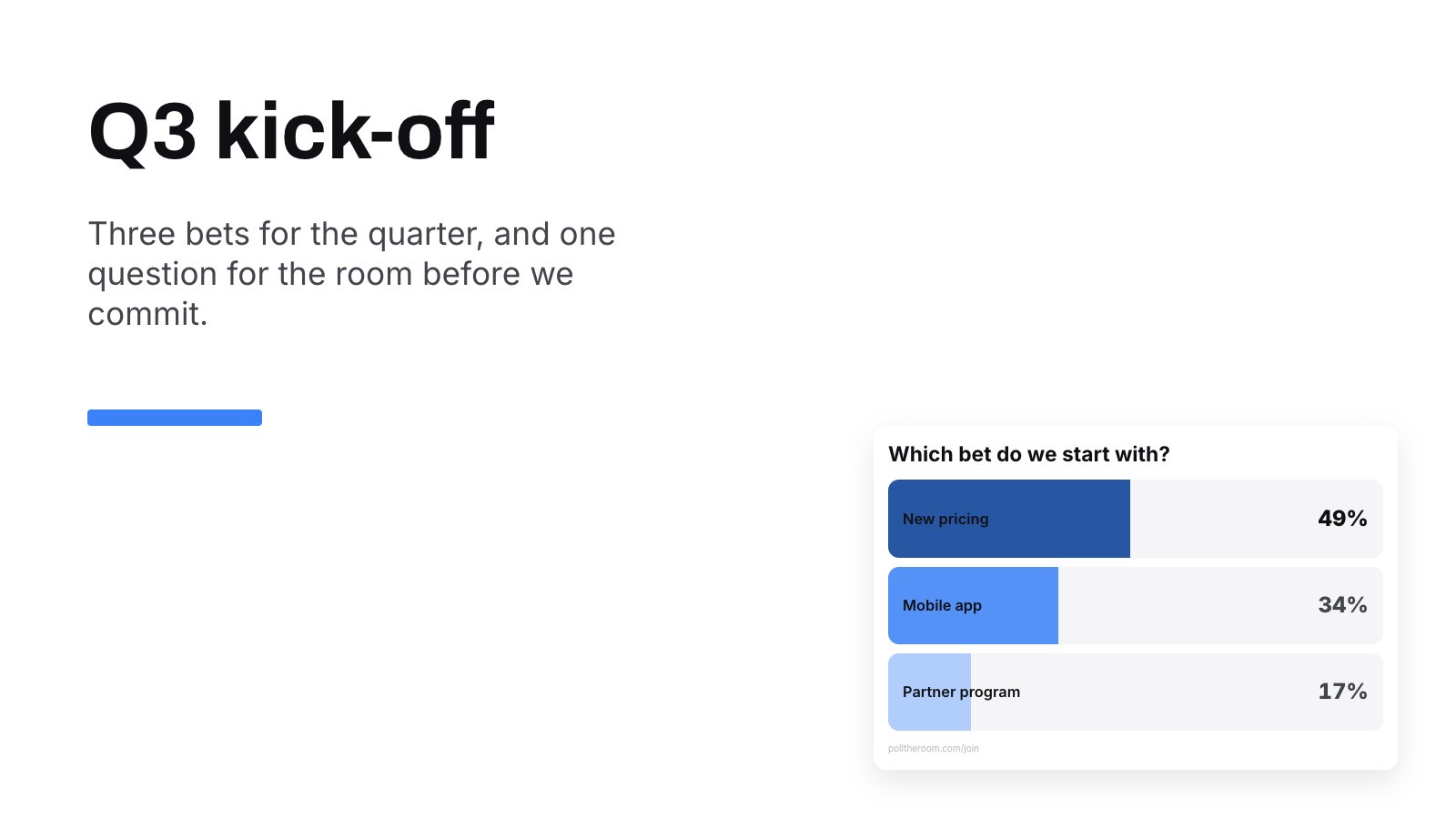
What get_screenshot hands back for that prompt.
What the agent does first
On connect the server tells the agent how a session goes. Build a deck withcreate_deck, attach a PDF with attach_pdf when there is one, put polls on slides with add_overlay, look at every slide it touched with get_screenshot and fix what problems names. Then go live with start_room and hand its presentUrl to the person presenting. That works for a deck with slide pages too; the server draws the pages first. The whole reference is one file at /llms-full.txt.
Tools
Every tool with its arguments, generated from the server’s own list.
Document and widgets
What the tools write. Every widget, its looks, and what it needs before it goes on stage.
When something fails
A tool that cannot do what was asked answers with a result markedisError and a sentence saying what to fix, so the agent can act on it. Only a missing key is refused at the protocol level, with 401.
The server shows as connected, but every tool call fails
The server shows as connected, but every tool call fails
Connecting and listing the tools need no key, so a client can show every tool while each call answers
No usable API key. The header did not arrive. Check that the variable the config reads is set where the client runs. An app opened from the Dock or the Start menu does not see variables from your shell profile, so start it from a terminal or put the key in the config itself.The client cannot connect at all
The client cannot connect at all
The server speaks Streamable HTTP and answers only
POST. A client set up for the older SSE transport opens the URL with GET, gets 405 and gives up. Pick the HTTP option, which is type: "http" in Claude Code and VS Code, httpUrl in Gemini CLI and serverUrl in Windsurf and Antigravity. Check that the URL ends in /api/mcp.The agent does not know a tool these docs describe
The agent does not know a tool these docs describe
A client reads the tool list when it connects, and this server does not announce changes. After a new tool ships, reconnect the server or restart the client.
A tool answers that the key can't do that
A tool answers that the key can't do that
The key lacks the scope that tool needs, or the team’s plan does not sell it. The answer names the scope. Make a new key with that scope under Settings › API, or move the team to Pro for
rooms:start.The agent runs into the hourly limit
The agent runs into the hourly limit
A key makes 60 requests an hour on the free plan and 1000 on Pro. Every tool call counts, a screenshot too; connecting and listing the tools do not. The answer says how many seconds to wait. An agent that looks at every slide after each small change spends the hour quickly, so ask it to look once per slide when it is done.
Claude Desktop shows an npx or Node error
Claude Desktop shows an npx or Node error
mcp-remote runs through npx, which needs Node.js on the machine. Install a current Node.js, then restart Claude Desktop.Keys and agents
A key acts for the person who made it, inside their team, and reaches the same decks they do. Give each agent its own key, so revoking one stops that agent and nothing else. An agent can bin a deck withdelete_deck; it stays in the bin for thirty days, the same as in the app.